《梦宵》

梦里想见到的人
大概在梦里也会找她吧
寻寻觅觅
大概也会从梦里惊醒吧
山中兰若
绝迹蓬蒿
云雨楚楚
化作烟雨倾覆你
执枪八方
暮雪空壕
沙场言笑
吹彻画角
江南晚客红绳发梢
胜者归来
卿与良宵

by:霜

《彼岸》

晚风给予你一丝清凉
抚去欲望与焦灼
每个闯荡归来的人
暮色都会赐予神秘的面纱
至此不分娇韵的脸庞
从还音行断
沉色暗涌
半生月色意在眉弯
许诺风声余留两尖
蝉鸣不知白昼
逾越一个又一个萧稠
叶落不知殇秋
辜负了一个又一个挽留
涓涓溪流
日月盘恒邻水至洲
愿作你流淌着的热血
拥有你的生息与衰亡
寒风总伴夜雪苍白人
尤留世间容褶白赴
蒯覆石泐凝霜
回首凝望
愿你醒来亦是彼岸
拥有了不一样的星光

by:霜

《余生》

弥静黑夜中的烛火
斑斑点点
彻夜通明
萦绕着小时候的记忆
你诉说理想
清澈明亮的眼睛
沾染不得生活的一丝浑浊
匆匆茫茫的行人
从不打烊的灯光
映忖着城市的繁华与喧嚣
每个长大的人
都演绎着哀忧悲怆
不一样的肝肠
痴心妄想的疯狂
从灵魂里涌入冰凉
遮住双眼
余生太长
这俗世
这一杯
这一次
为你行走锋芒

by:霜

Hexo博客landscape-plus主题修改侧边栏颜色

一、修改左侧边状态栏的文字颜色

路径地址Hexo/themes/landscape-plus/source/css/_partial/sidebar-aside.styl

1
2
3
4
5
6
7
8
9
10
11
12
13
14
15
16
17
18
19
20
21
22
23
24
25
26
27
28
29
30
31
#sidebar
@media mq-normal
column(sidebar-column)

.widget-wrap
margin: block-margin 0

.widget-title
font-size: 1.2em
@extend $block-caption

.widget
color: color-sidebar-text
text-shadow: 0 1px #fff
background: color-widget-background
box-shadow: 1px 2px 3px color-border
// box-shadow: 0 -1px 4px color-widget-border inset
//border: 1px solid color-widget-border
padding: 15px
border-radius: 3px
a
//color: color-grey 1
color: #488DB4 2
text-decoration: none
&:hover
text-decoration: underline
color: color-link
ul, ol, dl
ul, ol, dl
margin-left: 15px
list-style: disc

由位置1 color: color-grey 变更位置2 color: #488DB4

二、修改左侧边栏统计出来的数字颜色

路径地址Hexo/themes/landscape-plus/source/css/_partial/sidebar.styl

1
2
3
4
5
6
7
8
9
10
11
12
13
14
15
16
17
18
19
20
21
22
23
24
25
26
27
28
29
30
31
32
33
34
35
36
37
if sidebar is bottom
@import "sidebar-bottom"
else
@import "sidebar-aside"

.widget
@extend $base-style
line-height: line-height
word-wrap: break-word
font-size: 0.9em
ul, ol
list-style: none
margin: 0
ul, ol
margin: 0 20px
ul
list-style: disc
ol
list-style: decimal

.category-list-count
.tag-list-count
.archive-list-count
padding-left: 5px
//color: color-grey 1
color: #488DB4 2
font-size: 0.9em
&:before
content: "("
&:after
content: ")"

.tagcloud
font-size: 1.1em
a
margin-right: 5px
font-size: 20px

由位置1 color: color-grey 变更位置2 color: #488DB4

三、修改归档出来的文章按照年统计篇章数

路径地址Hexo/themes/landscape-plus/layout/_widget/archive.ejs

1
2
3
4
5
6
7
8
9
10
<% if (site.posts.length){ %>
<div class="widget-wrap">
<h3 class="widget-title"><%= __('archive') %></h3>
<div class="widget">
<!--<%- list_archives() %> -->
//<%- list_archives({format: 'YYYY年 MM月'}) %>
<%- list_archives({format: 'YYYY年'}) %>
</div>
</div>
<% } %>

由<%- list_archives({format: ‘YYYY年 MM月’}) %> 改成 <%- list_archives({format: ‘YYYY年’}) %>,以年统计减少数据展示更加简洁一些。

四、修改代码块高亮展示的时候的颜色和行数隐藏

路径地址Hexo/themes/landscape-plus/source/css/_partial/highlight.styl

1
2
3
4
5
6
7
8
9
10
11
12
13
14
15
16
17
18
19
20
21
22
23
24
25
26
27
28
29
30
31
32
33
34
35
36
37
38
39
40
41
42
43
44
45
46
47
48
49
50
51
52
53
54
55
56
57
58
59
60
61
62
63
64
65
66
67
68
69
70
71
72
73
74
75
76
77
78
79
80
81
82
83
84
85
86
87
88
89
90
91
92
93
94
95
96
97
98
99
100
101
102
103
104
105
106
107
108
109
110
111
112
113
114
115
116
117
118
119
120
121
122
123
124
125
126
127
128
129
130
131
132
133
134
135
136
137
138
139
140
141
142
143
144
145
146
147
148
149
150
151
152
153
154
155
156
157
158
159
160
161
highlight-background = #272822 /*#f8f8f8*/
highlight-current-line = #3E3D32
highlight-selection = #488DB4 /*#49483E*/
highlight-foreground = #F8F8F2 /*#525252*/
highlight-comment = #75715E
highlight-red = #F92672
highlight-orange = #42b983 /*#FD971F*/
highlight-yellow = #42b983 /*#E6DB74*/
highlight-green = #A6E22E
highlight-aqua = #A1EFE4
highlight-blue = #e96900 /*#66D9EF*/
highlight-purple = #AE81FF

$code-block
background: highlight-background
margin: 0 article-padding * -2
padding: 10px article-padding
border-style: solid
border-color: color-border
border-width: 0px 0 /*1px 0去掉边框*/
overflow: auto
color: highlight-foreground
line-height: font-size * line-height

$line-numbers
color: #666
font-size: 0em /*隐藏展示行数0.85em*/

.article-entry
pre, code
font-family: font-mono
code
background: #f0f0f0
text-shadow: 0 1px #fff
font-size: 0.85em
padding: 0 0.3em
border: 1px solid #dcdcdc
border-radius: 3px
pre
@extend $code-block
code
background: none
text-shadow: none
padding: 0
border: none
.highlight
@extend $code-block
pre
border: none
margin: 0
padding: 0
table
margin: 0
width: auto
td
border: none
padding: 0
figcaption
clearfix()
font-size: 0.85em
color: highlight-comment
line-height: 1em
margin-bottom: 1em
a
float: right
.gutter pre
@extend $line-numbers
text-align: right
padding-right: 20px
.line
height: font-size * line-height
.gist
margin: 0 article-padding * -1
border-style: solid
border-color: color-border
border-width: 1px 0
background: highlight-background
padding: 15px article-padding 15px 0
.gist-file
border: none
font-family: font-mono
margin: 0
.gist-data
background: none
border: none
.line-numbers
@extend $line-numbers
background: none
border: none
padding: 0 20px 0 0
.line-data
padding: 0 !important
.highlight
margin: 0
padding: 0
border: none
.gist-meta
background: highlight-background
color: highlight-comment
font: 0.85em font-sans
text-shadow: 0 0
padding: 0
margin-top: 1em
margin-left: article-padding
a
color: color-link
font-weight: normal
&:hover
text-decoration: underline

pre
.comment
.preprocessor
color: highlight-comment
.tag
color: highlight-foreground
.title
.variable
.regexp
.ruby .constant
.xml .tag .title
.xml .pi
.xml .doctype
.html .doctype
.css .id
.css .class
.css .pseudo
color: highlight-red
.number
.built_in
.literal
.constant
color: highlight-purple
.params
color: highlight-orange
.class
.ruby .class .title
.css .rules .attribute
.attribute
color: highlight-green
.string
.value
.inheritance
.header
.ruby .symbol
.xml .cdata
color: highlight-yellow
.css .hexcolor
color: highlight-aqua
.function
.python .decorator
.python .title
.ruby .function .title
.ruby .title .keyword
.perl .sub
.javascript .title
.coffeescript .title
color: highlight-blue
.keyword
.javascript .function
color: highlight-blue

由于代码快左边会出现行数,在复制的时候容易复制出来,所以给隐藏掉比较好。

Hexo博客landscape-plus新建分类写文章和基础配置介绍

这儿有一个整体主题使用排名: https://www.hexothe.me

在网上找了很多hexo主题,其中有的还是挺好看的。我喜欢简约看上去”干净”的主题,最后选择了landscape-plus的确满足我的风格,主题演示,主题github下载地址:https://github.com/xiangming/landscape-plus,而我的在这个基础上整合网上的大佬们整改了一些样式和一些细节处理,因为我感觉自己有”强迫症“。

首先我推荐自己感觉还不错的hexo主题:

Read More

Hexo博客landscape-plus加入评论系统Valine

Landscape-plus主题使用的是”多说“,但是多说早就停止运营了。

所以考虑其他的评论系统替换,这儿我查找了其他的评论如DisqusGitment来必力等,如果需要集成Gitment评论系统的可以参考这一篇文章,我最后选择了valine。

这儿参考了博客添加评论系统这篇文章,感谢这位小哥!

使用valine介绍

高速,使用国内后端云服务提供商 LeanCloud 提供的存储服务
开源,自定义程度高
支持邮件通知
支持验证码
支持 Markdown

valine 的安装和使用

1
2
# Duoshuo
duoshuo_shortname: reqianduan

Read More

Hexo博客landscape-plus移值next主题的站内搜索功能

由于landscape-plus主题使用的外部百度搜索,搜索到在进入目标文章。外部搜索没有站内搜素方便,其实next主题就有一个看上去不错的站内搜索,但是next主题又不是我喜欢的风格,所以查找很多博客文章最后看到可以移值next主题的搜索,所以有点兴趣,然后开始了next 主题搜索的移值功能。

参考了NexT本地搜索引擎的移植这篇文章,感谢这位小哥!期间也遇到很多小的问题这儿总结说一下。

search的安装和配置

打开博客所在目录,然后运行安装 npm install hexo-generator-searchdb --save,然后在博客的主要配置文件中_config.yml里面加上

1
2
3
4
5
search:
path: search.xml
field: post
format: html
limit: 1000

然后打开landscape-plus主题下的_config.yml

1
2
3
4
5
# search 
local_search:
enable: true
trigger: auto ## 表示搜索结果会不会打字时自动显示
top_n_per_article: -1 ## 表示每篇文章最多显示几条结果(-1为不限数字)

Read More

使用码云gitee搭建Hexo博客

前面介绍过使用 github + page搭建,但是github访问太慢了,每次感觉都要很久才会加载出来。码云搭建的快很多。

需要安装
  • Git
  • NodeJs

安装这两个自行百度吧,挺简单的。

这儿如果你是使用Mac的小伙伴 我直接放两个安装包地址出来 ,这样子省去你敲一堆命令行,也许还会出错。

NodeJs安装: 这个nodejs官网, 你可以直接下载mac node-v12.18.0.pkg 下载过直接安装然后成功过后会出现

This package has installed:
• Node.js v12.18.0 to /usr/local/bin/node
• npm v6.14.4 to /usr/local/bin/npm
Make sure that /usr/local/bin is in your $PATH.

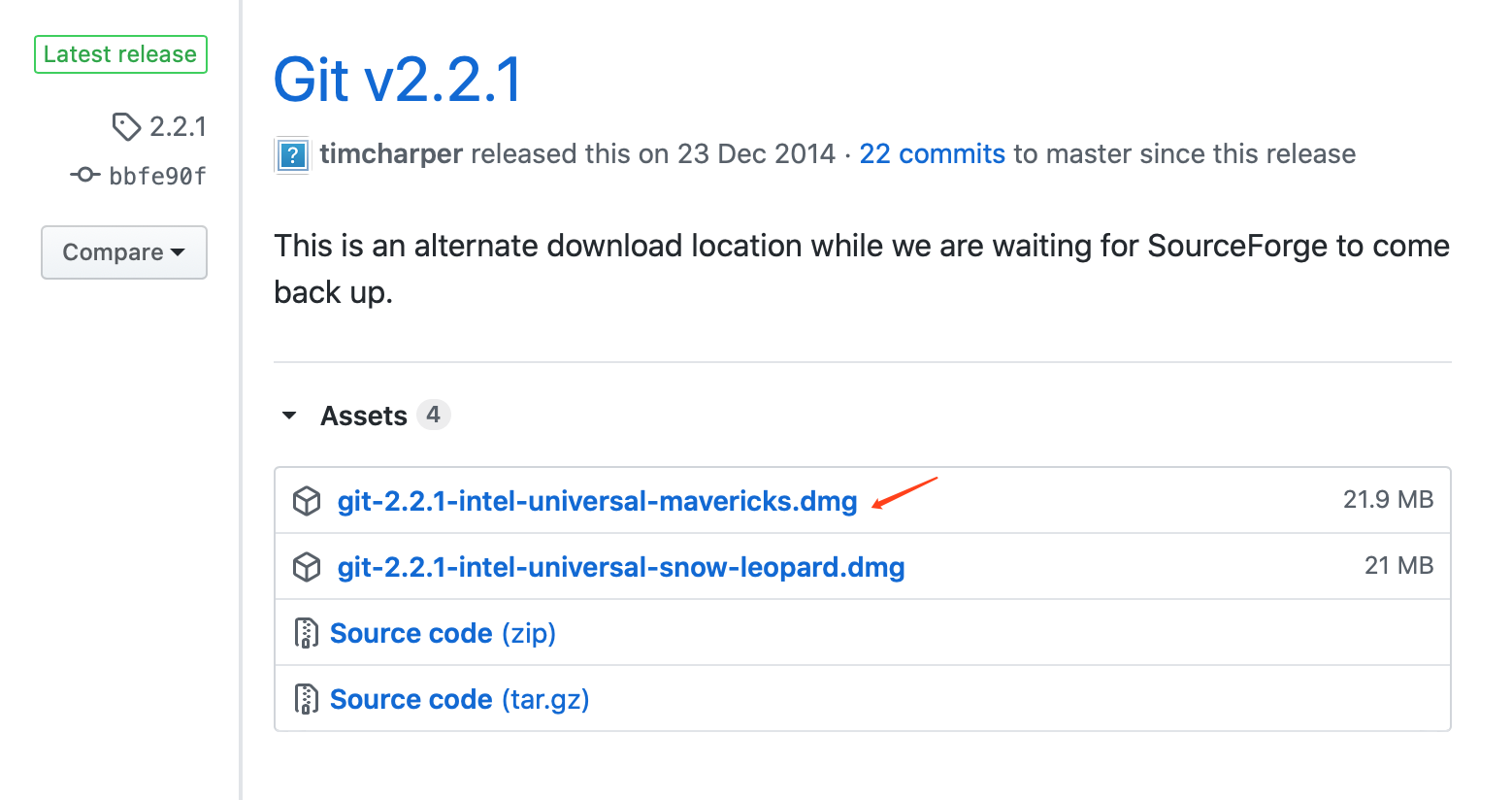
Git安装: 这个git网址, github地址 https://github.com/timcharper/git_osx_installer/releases 下载git-2.2.1-intel-universal-mavericks.dmg
Read More